> ## Documentation Index
> Fetch the complete documentation index at: https://docs.getlimina.ai/llms.txt
> Use this file to discover all available pages before exploring further.
# Customizing Object Detection
> This guide presents advanced techniques to help customize object detection.
New in 4.0.1
[Connect with one of our privacy experts](https://getlimina.ai/contact-us/?utm_source=docs\&utm_medium=website) to run this code.
Limina introduces the ability to enable or disable specific object entity types during file processing. This feature provides enhanced control over the types of objects detected and redacted in your files, allowing for more precise customization of redaction processes.
The techniques described here apply to both file processing routes of the Limina APIs—the [File URI route](/latest/process-files-uri/) and the [File Base64 route](/latest/process-files-base64/).
This customizable object detection feature works seamlessly across all [supported file types](/configuration-and-operations/working-with-files/supported-file-types) where object detection can be performed, including images, PDFs, and Office documents.
## Enabling and Disabling Object Entity Types
In file processing, Limina supports the detection of several object types including: license plates, logos, signatures and faces. See [object entity types](/entities/supported-object-entities) for a complete list. By default, all supported types are detected, but this can be easily customized using object entity selectors.
### Configuring Object Entity Selectors
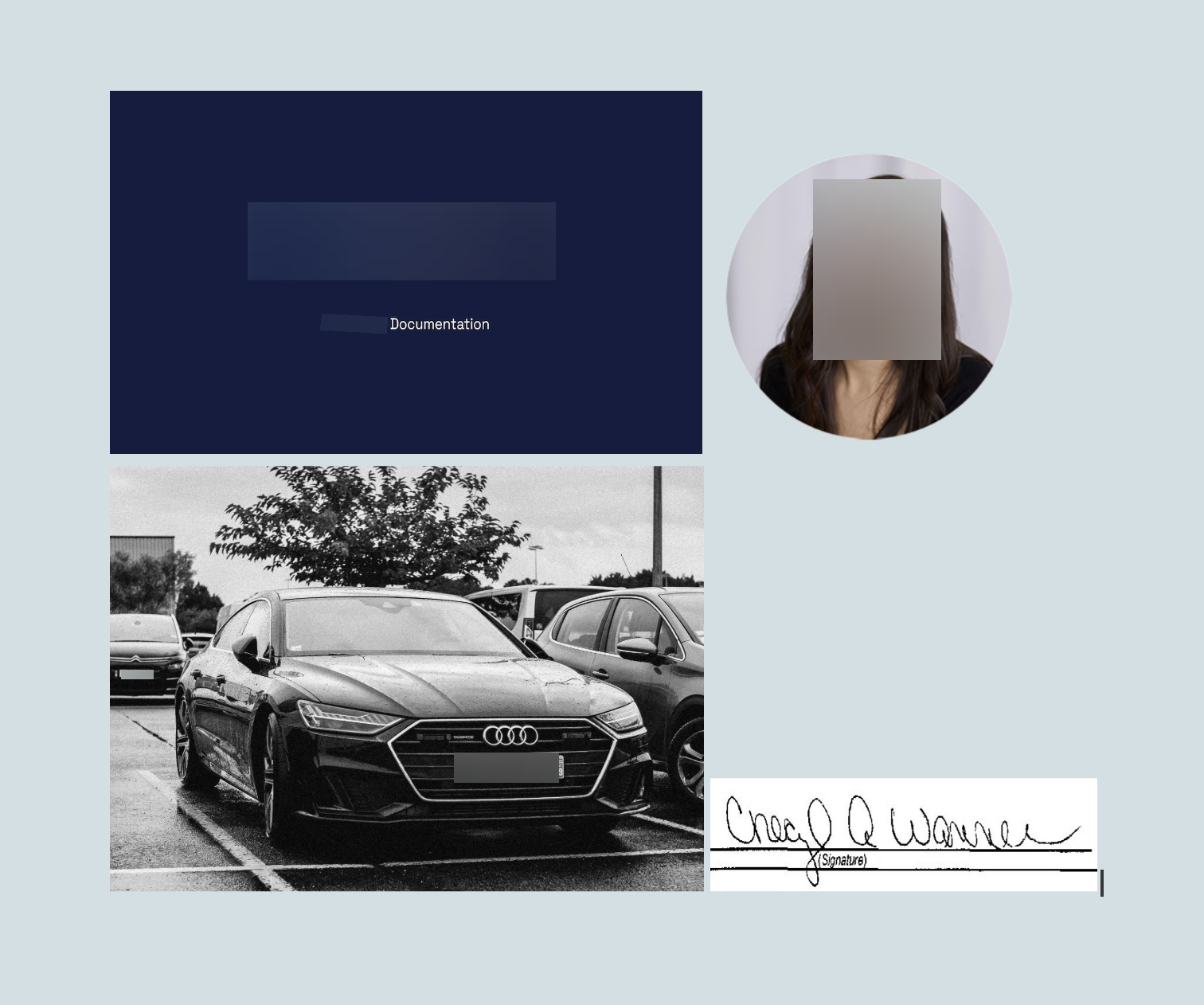
Object entity selectors allow you to *enable* or *disable* specific entity types as part of your API request. For example, you can enable detection of `LOGO`, `LICENSE_PLATE` and `SIGNATURE` while ignoring all other entity types by using the `ENABLE` selector as shown in this request:
For descriptions of the request fields, refer to the [REST API documentation](/latest/process-files-uri).
```json Request Body wrap lines highlight={6-13} theme={"theme":"poimandres"}
{
"uri": "path/to/file.png",
"entity_detection": {
"return_entity": true
},
"object_entity_detection": {
"object_entity_types": [
{
"type" : "ENABLE",
"value" : ["FACE", "LICENSE_PLATE", "LOGO"]
}
]
}
}
```
```json Sample Response wrap lines theme={"theme":"poimandres"}
{
"result_uri": "path/to/file.redacted.png",
"processed_text": "[OCCUPATION_1] Documentation CneQ X(Signature)",
"entities": [
{
"processed_text": "OCCUPATION_1",
"text": "Developer",
"location": {
"page": 0,
"x0": 0.26653,
"x1": 0.32143,
"y0": 0.3122,
"y1": 0.33201
},
"best_label": "OCCUPATION",
"labels": {
"OCCUPATION": 0.8031
}
}
],
"objects": [
{
"type": "FACE",
"location": {
"page": 0,
"x0": 0.68737,
"x1": 0.77033,
"y0": 0.1996,
"y1": 0.33782
}
},
{
"type": "LICENSE_PLATE",
"location": {
"page": 0,
"x0": 0.37761,
"x1": 0.46474,
"y0": 0.74885,
"y1": 0.77917
}
},
{
"type": "LICENSE_PLATE",
"location": {
"page": 0,
"x0": 0.10116,
"x1": 0.12824,
"y0": 0.66658,
"y1": 0.67642
}
},
{
"type": "LOGO",
"location": {
"page": 0,
"x0": 0.20612,
"x1": 0.46193,
"y0": 0.20155,
"y1": 0.27935
}
}
],
"entities_present": true,
"objects_present": true,
"languages_detected": {
"en": 0.5266358852386475
},
"audio_duration": null,
"page_count": null
}
```
As expected, this configuration redacts faces, logos, and license plates while leaving other entities (`SIGNATURE` in this case) untouched in the output file.

 It is sometimes more convenient to specify the object entity types you wish to disable. This can be done using a `DISABLE` selector:
```json Request Body wrap lines highlight={9} theme={"theme":"poimandres"}
{
"uri": "path/to/file.png",
"entity_detection": {
"return_entity": true
},
"object_entity_detection": {
"object_entity_types": [
{
"type" : "DISABLE",
"value" : ["LICENSE_PLATE"]
}
]
}
}
```
```json Sample Response wrap lines theme={"theme":"poimandres"}
{
"result_uri": "path/to/file.redacted.png",
"processed_text": "[OCCUPATION_1] Documentation OE66OXC FB-692-NF",
"entities": [
{
"processed_text": "OCCUPATION_1",
"text": "Developer",
"location": {
"page": 0,
"x0": 0.26653,
"x1": 0.32143,
"y0": 0.313,
"y1": 0.33201
},
"best_label": "OCCUPATION",
"labels": {
"OCCUPATION": 0.864
}
}
],
"objects": [
{
"type": "FACE",
"location": {
"page": 0,
"x0": 0.68737,
"x1": 0.77033,
"y0": 0.1996,
"y1": 0.33782
}
},
{
"type": "LOGO",
"location": {
"page": 0,
"x0": 0.20612,
"x1": 0.46193,
"y0": 0.20155,
"y1": 0.27935
}
},
{
"type": "SIGNATURE",
"location": {
"page": 0,
"x0": 0.59876,
"x1": 0.90482,
"y0": 0.78631,
"y1": 0.87875
}
}
],
"entities_present": true,
"objects_present": true,
"languages_detected": {},
"audio_duration": null,
"page_count": null
}
```
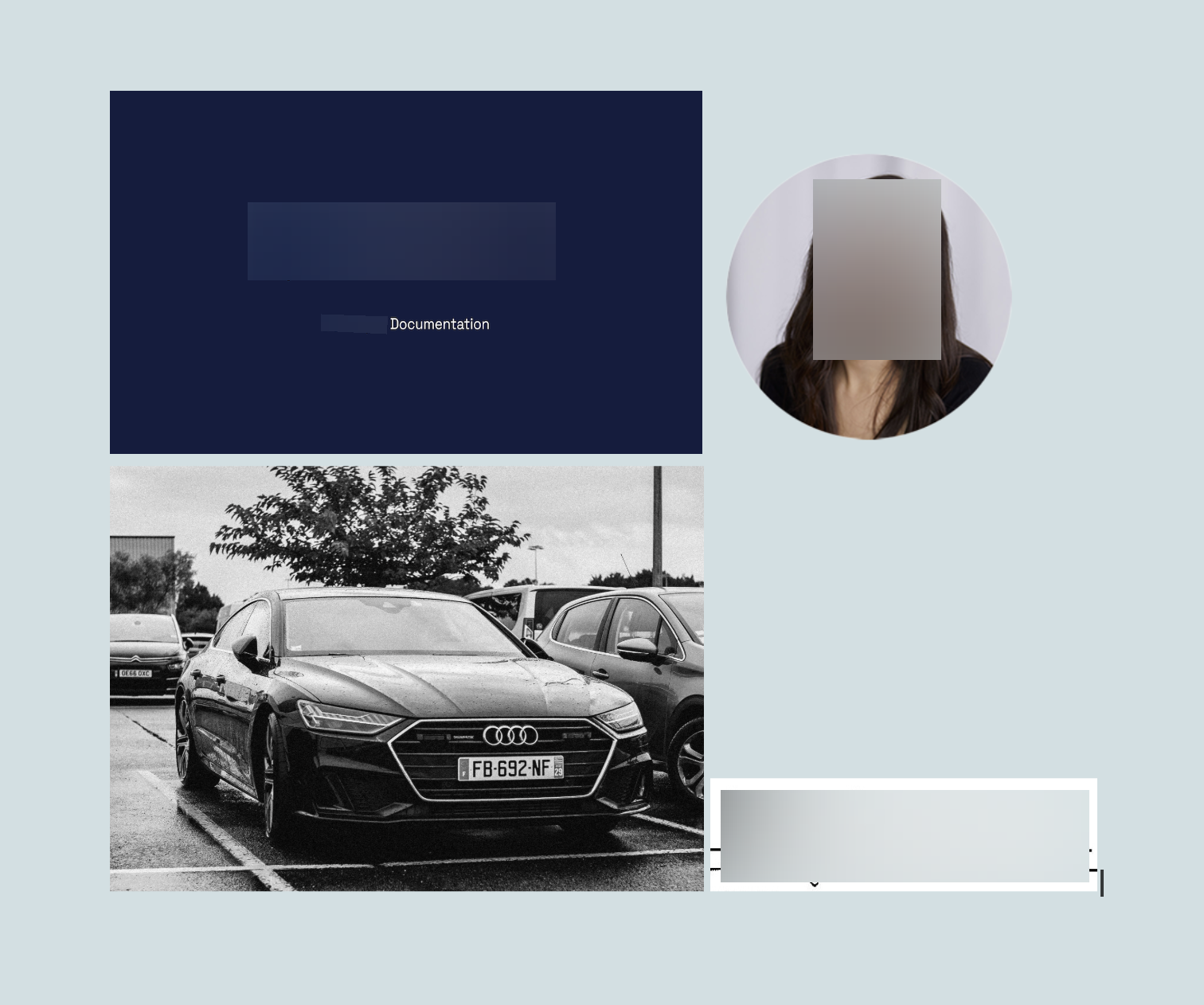
The above request will redact all entity types except license plates, as shown below:
It is sometimes more convenient to specify the object entity types you wish to disable. This can be done using a `DISABLE` selector:
```json Request Body wrap lines highlight={9} theme={"theme":"poimandres"}
{
"uri": "path/to/file.png",
"entity_detection": {
"return_entity": true
},
"object_entity_detection": {
"object_entity_types": [
{
"type" : "DISABLE",
"value" : ["LICENSE_PLATE"]
}
]
}
}
```
```json Sample Response wrap lines theme={"theme":"poimandres"}
{
"result_uri": "path/to/file.redacted.png",
"processed_text": "[OCCUPATION_1] Documentation OE66OXC FB-692-NF",
"entities": [
{
"processed_text": "OCCUPATION_1",
"text": "Developer",
"location": {
"page": 0,
"x0": 0.26653,
"x1": 0.32143,
"y0": 0.313,
"y1": 0.33201
},
"best_label": "OCCUPATION",
"labels": {
"OCCUPATION": 0.864
}
}
],
"objects": [
{
"type": "FACE",
"location": {
"page": 0,
"x0": 0.68737,
"x1": 0.77033,
"y0": 0.1996,
"y1": 0.33782
}
},
{
"type": "LOGO",
"location": {
"page": 0,
"x0": 0.20612,
"x1": 0.46193,
"y0": 0.20155,
"y1": 0.27935
}
},
{
"type": "SIGNATURE",
"location": {
"page": 0,
"x0": 0.59876,
"x1": 0.90482,
"y0": 0.78631,
"y1": 0.87875
}
}
],
"entities_present": true,
"objects_present": true,
"languages_detected": {},
"audio_duration": null,
"page_count": null
}
```
The above request will redact all entity types except license plates, as shown below:
 ## Security Considerations
It is important to note that **disabling object entities may increase the risk of sensitive information being leaked**. When selecting object entities for redaction, take extra time to consider all potential implications.
We recommend expert validation to ensure that the redacted content is free of PII or other sensitive information. Following validation, adjust the list of object entities as needed based on the findings.
**Object Detection and OCR interactions**
In some cases, even when specific object detection types like `LICENSE_PLATE`, `LOGO`, or `SIGNATURE` are disabled, the associated text may still be redacted. This happens because the OCR identifies and processes the text within these objects, such as license numbers, readable text in logos, or legible parts of signatures.
For example:
* A license plate may be redacted because the license number is recognized as text.
* A logo with a company name may be redacted due to the company name being recognized as text.
* A handwritten signature may be partially or fully redacted if its characters are interpreted as text.
This highlights the interaction between object detection and text redaction, where OCR-based text redaction can occur independently of object detection settings.
## Security Considerations
It is important to note that **disabling object entities may increase the risk of sensitive information being leaked**. When selecting object entities for redaction, take extra time to consider all potential implications.
We recommend expert validation to ensure that the redacted content is free of PII or other sensitive information. Following validation, adjust the list of object entities as needed based on the findings.
**Object Detection and OCR interactions**
In some cases, even when specific object detection types like `LICENSE_PLATE`, `LOGO`, or `SIGNATURE` are disabled, the associated text may still be redacted. This happens because the OCR identifies and processes the text within these objects, such as license numbers, readable text in logos, or legible parts of signatures.
For example:
* A license plate may be redacted because the license number is recognized as text.
* A logo with a company name may be redacted due to the company name being recognized as text.
* A handwritten signature may be partially or fully redacted if its characters are interpreted as text.
This highlights the interaction between object detection and text redaction, where OCR-based text redaction can occur independently of object detection settings.