
Reporting Integration

The Limina container can be configured to send reporting metrics to a logstash server. To enable this feature, the following environment variables can be added to the docker run command:
Variable NameDescription
PAI_ENABLE_REPORTINGEnables Reporting to a Logstash Server
LOGSTASH_HOSTThe Logstash server’s host info
LOGSTASH_PORTThe port of the Logstash server
LOGSTASH_MONITORING_PORTThe monitoring API port of the Logstash server.
LOGSTASH_TTLSets the time to live value (in seconds) of the data queued for logstash. Data will be lost if the queued data is not sent successfully before the ttl value.
PAI_REPORT_ENTITY_COUNTEnables entity counts (per piece of text deidentified) to be added to reporting
To run a container with these settings, the following command can be used:
Docker Command
docker run --rm -p 8080:8080 --mount type=bind,src=$PWD/tests/fixtures/licenses/license.json,dst=/app/license/license.json -e PAI_ENABLE_REPORTING=true -e LOGSTASH_HOST=http://hostname.org -e LOGSTASH_PORT=50000 -e PAI_REPORT_ENTITY_COUNTS=true -it deid:image-name
The Logstash pipeline that the data is being sent to must be configured to able to accept JSON objects. A sample pipeline configuration that allows this would be:
Pipline Config
input {
	tcp {
		port => 50000
		codec => json_lines {}
	}
}
output {
	elasticsearch {
		hosts => "elasticsearch:9200"
		user => "${LOGSTASH_USER}"
		password => "${LOGSTASH_PASSWORD}"
	}
}

What is Being Sent?

When PAI_ENABLE_REPORTING is enabled in the container metering records will be sent to Logstash in batches, at 5 minute intervals. All records include the following fields:
Field NameDescription
privateai.SessionIdA unique id that relates all metering information sent in the interval
privateai.AccuracyThe accuracy used in the requests
privateai.ProjectIdThe project id of the request (the default value is main)
privateai.SyntheticBoolean value indicating if synthetic data was used
The following meters are currently being used (one record per meter, per project ID):
Field NameDescription
privateai.api_callsThe amount of api calls sent in the interval
privateai.api_charsThe amount of characters processed in the interval
privateai.api_wordsThe amount of words processed in the interval
If PAI_ENABLE_PII_COUNT_METERING is enabled in the container, meters for each entity found will also be sent. These meters contain the following fields:
Field NameDescription
privateai.pii-countThe amount of times the entity was found to be the best label in the interval
If PAI_REPORT_ENTITY_COUNTS is enabled in the container, a record of the entities found and their counts for each unit of text processed will be sent. e.g.
Metering Records
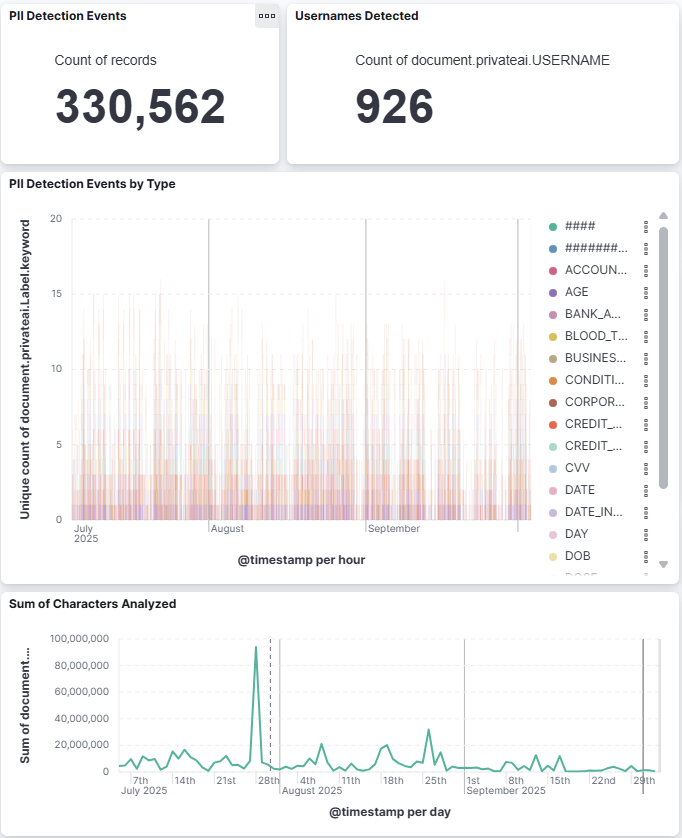
privateai.NAME: 2
privateai.OCCUPATION: 1
would indicate that in a unit of text processed, the entity NAME was the best label two times, and OCCUPATION was the best label once.
Example dashboard